
.svg)
.svg)
What we'd do if it were our money
Google Business Profile Posts: The Social Channel Most Businesses Ignore
Google Business Profile posts are short updates, offers, and events you publish directly to your business listing on Google Search and Maps. They show up where customers are already looking for a business like yours, which makes them one of the highest-intent marketing channels a small business has.
The reality is most businesses treat social media as Instagram and Facebook, and leave their Google profile untouched for months. Those platforms reach people who are scrolling. Your Google profile reaches people who are deciding.
Quick answer: how to use Google Business Profile posts
- Post at least once a week so your profile looks active and current
- Use all three post types: updates, offers, and events
- Lead with a real photo of your business, not stock imagery
- Keep copy short, specific, and local, with one clear call to action
- Track views and clicks in your profile's performance reports, then adjust
Why Google posts matter more than most businesses think
On Instagram, you're interrupting someone's scroll. On Google, the customer came to you. They searched "dentist near me" or "best tacos in Heber City" and your profile is one of three or four options in front of them.
That's the moment a post earns its keep. A fresh offer, a recent project photo, or an upcoming event gives the searcher a reason to pick you over the listing next to you.
Google posts help in three ways:
- They signal an active business. A profile with recent posts looks open, staffed, and current. One with nothing since last year looks the opposite.
- They answer questions before the click. Posts can show new services, seasonal hours, and promotions without the customer opening your website.
- They give Google more context. Posts add fresh detail about what you offer, which supports the rest of your local SEO work.
To be clear, Google hasn't confirmed posts as a direct ranking factor. Treat them as a conversion tool first. The goal is more calls, direction requests, and bookings from people already looking.
Why most businesses skip them
Most teams miss this channel for simple reasons. It doesn't feel like social media, there are no followers to grow, and nobody owns it. The profile gets set up once, then forgotten. That's exactly why it's an opening: your competitors probably aren't posting either.
The three post types and when to use each
Google offers three post types, all created from the "Add update" option in your profile.
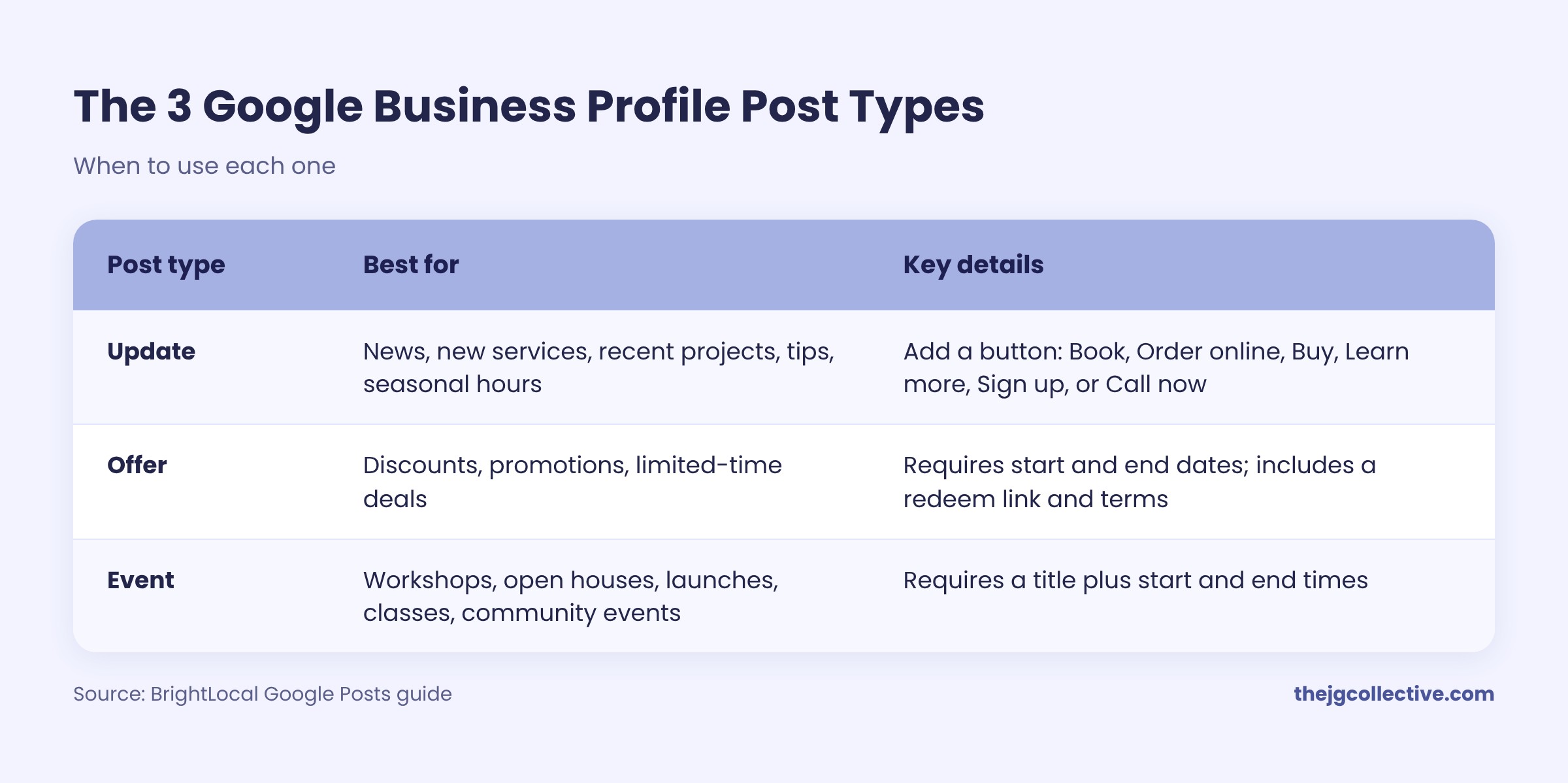
Updates should be your weekly default. Offers and events work best when you have something real and time-bound, since urgency is what makes them effective.
Specs to know
- Copy: Google allows up to 1,500 characters, but 80 to 100 words reads best
- Images: JPG or PNG; square or 4:3 crops display most reliably across devices
- Video: short clips work; keep them under 30 seconds
- Newer posts show first, so a fresh update will push an older offer down even if it's still active
Source: BrightLocal's Google Posts guide
Anatomy of a Google post that gets clicks
A good Google post isn't a repurposed Instagram caption. It's written for someone comparing options right now.
- A real photo. Your team, your space, your finished work. Stock images look like every other listing, and local studies of post performance have found original photos earn noticeably more clicks.
- A specific first line. The first sentence is often all that shows. Lead with the offer, the result, or the news.
- Local detail. Name the city, neighborhood, or season. "Fall furnace tune-ups in Heber City" beats "Book your tune-up today."
- One call to action. Pick the single action you want and match the button to it.
- A reason to act now. A date, a limited number of spots, or a seasonal window.
Example: a weak post vs. a strong one
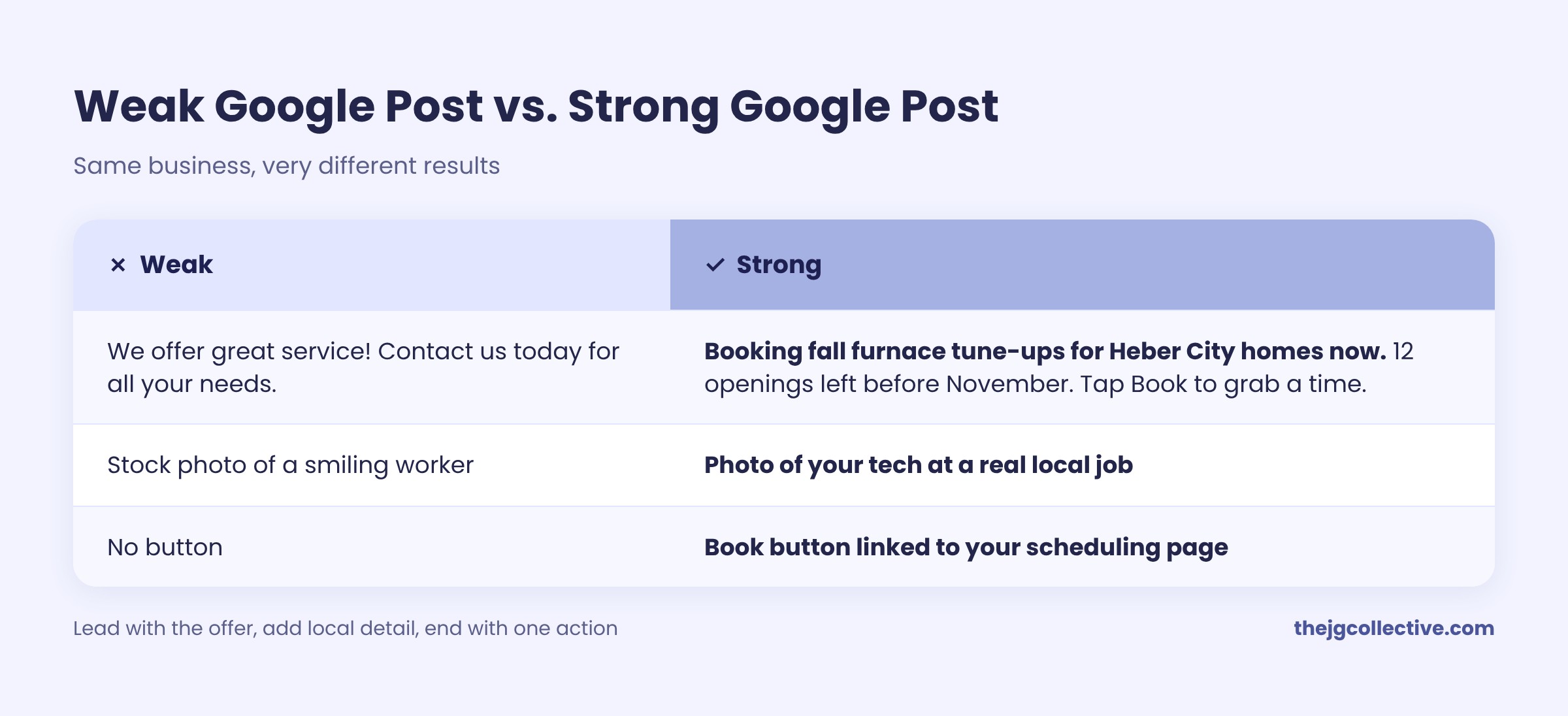
One rule to remember: don't put a phone number in the post text. Google can reject posts that include contact details. Use the Call now button instead.
A simple monthly system: four posts, one hour
You don't need a content team for this. You need a repeatable rhythm. Here's a four-week rotation that covers every reason a customer might choose you.
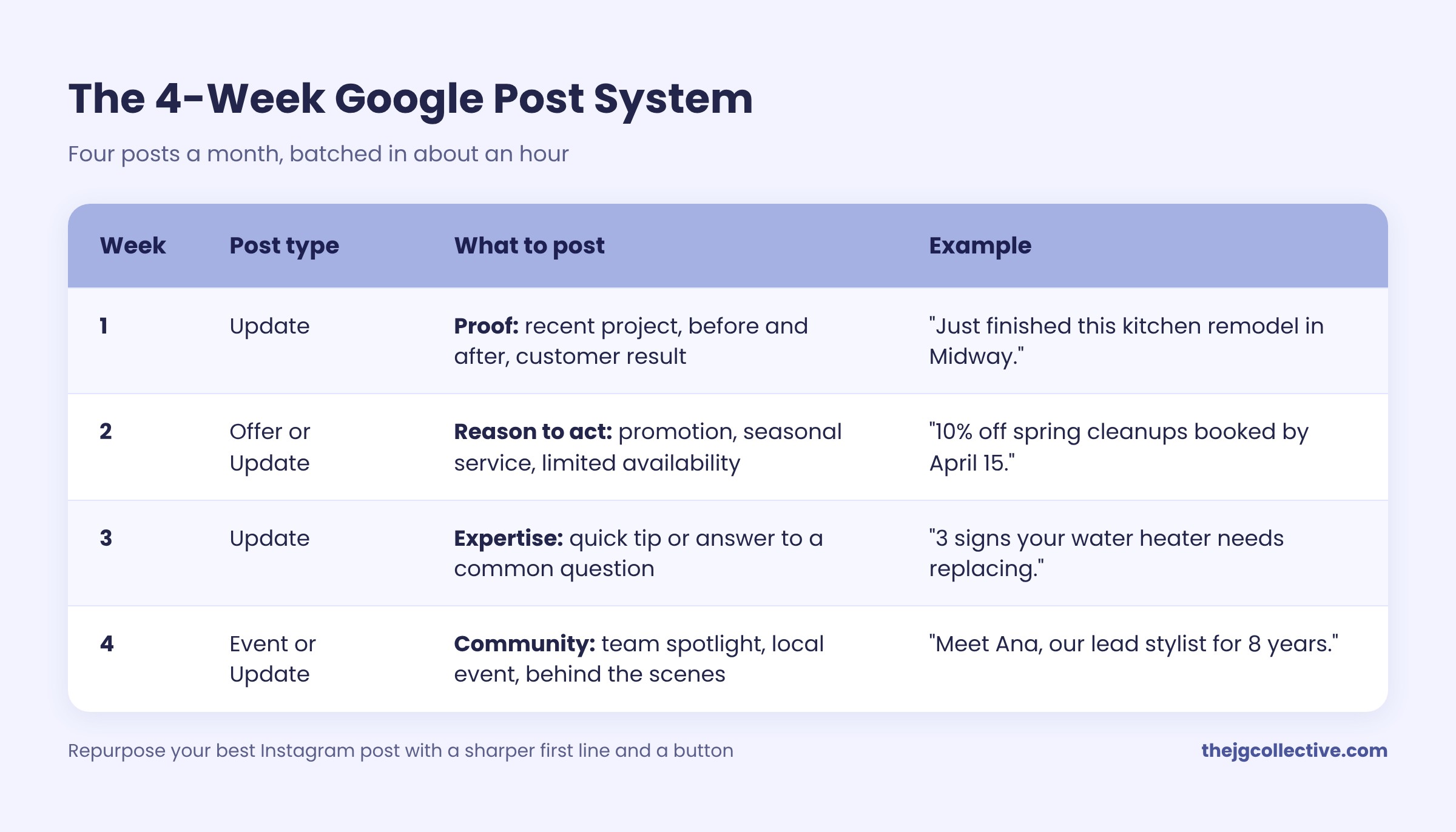
Batch all four in one sitting at the start of the month. Pull photos from your phone, write 80 to 100 words each, and schedule or post them weekly.
Most teams miss this: repurpose, don't reinvent. Your best Instagram post of the week can become your Google post with a sharper first line, a local detail, and a button. One piece of content, two channels, very different audiences.
How to measure whether it's working
Google posts don't have likes or followers, which is part of why businesses ignore them. Measure what actually matters instead: actions.
In your Google Business Profile performance report, track monthly:
- Calls from your profile
- Website clicks
- Direction requests
- Bookings or messages, if enabled
- Searches that showed your profile
On your website, add UTM tags to post links (for example, utm_source=google&utm_medium=gbp-post) so Google Analytics shows exactly which visits and conversions came from posts.
The metric anchor: compare your profile's calls and website clicks in the 90 days before you start posting with the 90 days after. That's the number that tells you whether posts are pulling customers, not whether people liked a picture.
Common mistakes to avoid
- Posting once, then disappearing. A single post from last year signals a dormant business. Consistency beats volume.
- Using stock photos. They make you look like everyone else in the results.
- Copying Instagram captions word for word. Hashtags and emoji-heavy copy don't fit a search audience looking for a decision.
- Adding phone numbers in the text. This can get posts rejected. Use the Call now button.
- No call to action. Every post should point to one next step.
- Ignoring the rest of the profile. Posts can't fix wrong hours, missing services, or unanswered reviews. Keep the whole profile current.
- Never checking results. Without tracking calls and clicks, you can't tell which post types work for your business.
Frequently asked questions
What are Google Business Profile posts?
Google Business Profile posts are updates, offers, and events a business publishes to its Google listing. They appear on the business profile in Google Search and Maps, where customers see them while deciding who to contact.
How often should a small business post on Google Business Profile?
Aim for at least one post a week. Weekly posting keeps your profile looking active and gives searchers fresh reasons to choose you.
Do Google Business Profile posts help with SEO?
Google hasn't confirmed posts as a direct ranking factor. They support local SEO by keeping your profile active and adding detail about your services, and they can increase calls, clicks, and direction requests.
How long do Google Business Profile posts stay visible?
Update posts generally stay active for about six months. Offer and event posts follow the dates you set, and newer posts appear first on your profile.
What should I post on my Google Business Profile?
Post recent work, promotions, quick tips, team spotlights, and upcoming events. Use real photos, mention your location, and include one clear call to action.
Can I put my phone number in a Google post?
Avoid it. Google can reject posts that include phone numbers or other contact details in the text. Use the Call now button instead.
The bottom line
Your Google Business Profile is the one social channel where every viewer is already looking for what you sell. Four posts a month, built on real photos and one clear action, can turn that attention into calls and bookings.
The businesses winning local search aren't always the biggest. They're the ones that look active when a customer is deciding.
Want your Google profile working as hard as your social media? JG Collective builds local SEO and social media systems for Utah small businesses, in English and Spanish, including Google Business Profile management. Book a free consultation and we'll review your profile and show you what to fix first.