
.svg)
.svg)
.jpg)
What we'd do if it were our money
How to Show Up in ChatGPT: Check Your Business in 20 Min
To check whether your business shows up in ChatGPT, write 10 to 20 questions your customers actually ask, run each one in a clean ChatGPT session at least three times, and record how often you are named, who is named instead, and whether ChatGPT gets your facts right. That percentage, not a single screenshot, is your real ChatGPT visibility.
The reality is that most business owners check once. They type their business name into ChatGPT, see a decent description, and assume they are covered. But your customers are not typing your name. They are asking "who is the best family dentist in Heber City?" or "who can fix a furnace in Park City this week?" Those are the questions that decide whether you get the call.
This guide walks through the exact test we use, how to read the results, and what to fix first if ChatGPT is recommending your competitors instead of you.
How ChatGPT finds and recommends local businesses
ChatGPT does not have its own map of every business. For local questions, it searches the web and pulls from business listings and directories, then picks the businesses it has the most consistent, trustworthy evidence for. If you understand where it looks, you understand why it does or does not name you.
Here is what is known about where ChatGPT gets local business information:
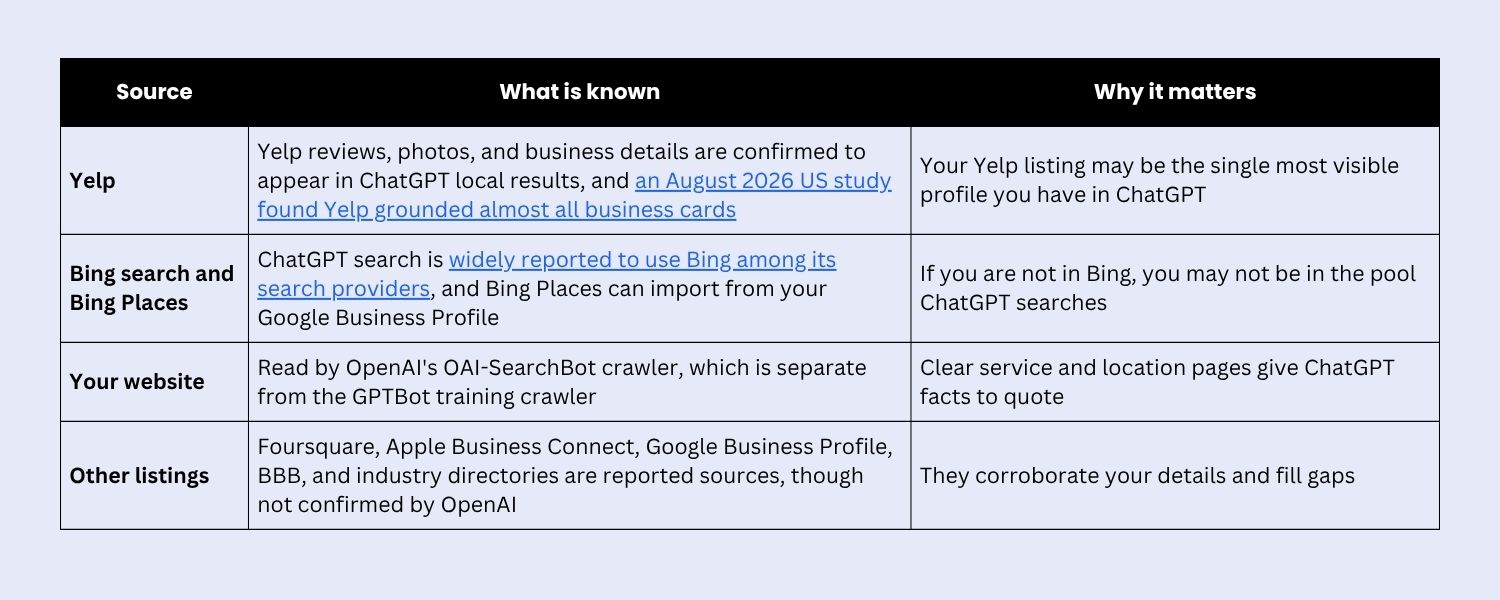
Most teams miss this: the data sources behind ChatGPT shift. In 2025, many guides claimed Foursquare supplied 60% to 70% of ChatGPT's local results. A larger 2026 study measured Foursquare at zero. Anyone who tells you there is one magic directory is guessing. The durable strategy is to be complete and consistent everywhere ChatGPT might look.
One more thing to know before you test: ChatGPT is far pickier than Google. SOCi's 2026 Local Visibility Index found ChatGPT recommended just 1.2% of local business locations, compared to 35.9% that appeared in Google's local 3-Pack. A strong Google ranking does not mean ChatGPT will name you. That is exactly why you need to check.
How to check if ChatGPT recommends your business: step by step
The test takes about 20 minutes the first time. The setup matters more than people think, because ChatGPT personalizes answers and varies them from run to run.
Step 1: Build your prompt set
Write 10 to 20 prompts across five types. Use the words your customers use, not your industry's words.
.jpg)
If you serve Spanish-speaking customers, write three to five prompts in Spanish too. ChatGPT answers each language from the sources it can find in that language, and results can differ sharply.
Step 2: Set up a clean test
- Use a Temporary Chat or a logged-out browser window so your past conversations and saved memories do not steer the answer toward you.
- Always include the city or area in the prompt. Otherwise ChatGPT guesses your location, and the guess may not match your market.
- If the answer does not show sources or a map, add "search the web" to the prompt so ChatGPT pulls current information instead of relying only on what it learned in training.
- Test on both desktop and the mobile app at least once. Mobile local results can show map cards that change what customers see first.
Step 3: Run each prompt three times
This is the step everyone skips. SparkToro's research found that when you ask an AI tool for recommendations repeatedly, the odds of getting the same list twice are under 1 in 100, and the same list in the same order is closer to 1 in 1,000. One screenshot proves almost nothing.
What held up in that same study was visibility percentage: how often a business appears across many runs. So run every prompt at least three times, in a new temporary chat each time, and count appearances.
Step 4: Record everything
For every run, log: the prompt, the date, whether you were named, your position if listed, which competitors were named, which sources ChatGPT cited, and any wrong facts about your business. A simple spreadsheet works.
How to score your results
Turn your log into four numbers. Together they tell you more than any ranking ever could.
.jpg)
For example: you ran 15 prompts three times each, for 45 runs. You were named in 9. Your mention rate is 20%. If your top competitor was named in 27 of those same runs, they hold three times your visibility, and you know exactly who to study.
Do not obsess over position. Because the order changes almost every run, being third in one answer and first in the next is noise. Appearance rate is the signal.
What your results mean
Every result points to one of three breakdowns: ChatGPT cannot find you, cannot understand you, or does not trust you enough to name you. Diagnose before you fix, or you will spend money on the wrong layer.
.jpg)
The cited sources are your roadmap. When ChatGPT names a competitor, look at what it linked to. If it is their Yelp page, a local news article, and a "best of" list, those are the three places you need to show up next.
How to show up in ChatGPT: what to fix, in order
Showing up in ChatGPT comes down to three jobs: be in the sources it searches, make your facts easy to pull, and give it enough independent proof to recommend you. Work in this order, because each step makes the next one count.
- Unblock the crawler. Open yoursite.com/robots.txt and confirm you are not blocking OAI-SearchBot, the crawler OpenAI uses to surface sites in ChatGPT search. You can block GPTBot (training) and still allow OAI-SearchBot (search). Also confirm Bingbot is allowed.
- Claim the listings ChatGPT draws from. Complete Yelp, Bing Places, Apple Business Connect, and Foursquare, plus your Google Business Profile and the top directory in your industry. Fill every field: categories, services, hours, photos, and a description that says what you do and where.
- Make your details identical everywhere. Same business name, address, phone, website, and hours across every listing and your site. Conflicting details are one of the fastest ways to get filtered out.
- Build pages that answer real questions. One page per service and per area you serve. Lead each section with a direct answer, and include price ranges, timelines, service area, and who the service is for.
- Add LocalBusiness schema. Mark up your name, address, phone, hours, service area, and services, with sameAs links to your Yelp, Google, and other profiles. It ties your scattered listings into one clear identity.
- Grow reviews beyond Google. ChatGPT leans on Yelp and other review sources, and locations it recommends average 4.3 stars. Ask every happy customer, and ask them to mention the service and the city.
- Earn independent mentions. Local news, chamber of commerce listings, sponsorship pages, partner sites, and "best of" roundups give ChatGPT third-party confirmation that you are real and good.
For the full framework behind these steps, read our guide: What Is Answer Engine Optimization? A Guide for Local Businesses.
How to track your ChatGPT visibility over time
Re-run the same prompt set once a month and compare your four scores. Keep the prompts identical so you are measuring your progress, not a change in questions. Listing fixes can show up within weeks; reviews and mentions usually take a few months to move the numbers.
Three other signals help you see the full picture:
- ChatGPT referral traffic. In Google Analytics 4, check Traffic acquisition for sessions from chatgpt.com. ChatGPT search usually tags its outbound links with utm_source=chatgpt.com, so filter for that too.
- Branded search lift. Many people who see you in ChatGPT go to Google to verify you before calling. A rise in searches for your business name in Google Search Console is often the clearest downstream signal.
- Ask every new customer. Add "ChatGPT or another AI tool" to your "How did you hear about us?" options. It catches the customers who never click a link.
Once you are tracking more than a handful of prompts, tools like Semrush, Ahrefs, and BrightLocal can automate the runs. Choose tools that report how often you appear across many runs, not a single "AI ranking" position. As SparkToro's research showed, positions in AI answers are too unstable to mean much.
Frequently asked questions
How do I show up in ChatGPT?
To show up in ChatGPT, make sure OpenAI's OAI-SearchBot can crawl your website, claim and complete your listings on Yelp, Bing Places, Apple Business Connect, and Google, keep your business details identical everywhere, publish clear service and location pages, and build recent reviews and local mentions.
How do I check if ChatGPT recommends my business?
Open a Temporary Chat, ask the questions your customers ask, like "best [service] in [city]," and include your city in every prompt. Run each prompt at least three times and track how often you are named. That appearance rate is your ChatGPT visibility.
Why does ChatGPT give different answers every time?
ChatGPT generates each answer fresh, so the businesses it lists and their order change from run to run. SparkToro found less than a 1 in 100 chance of getting the same recommendation list twice. That is why you measure how often you appear, not where you rank.
Does ChatGPT use Google reviews?
ChatGPT does not rely on Google the way Google's own AI does. It is confirmed to use Yelp data for local results and is widely reported to search through Bing. Google reviews still matter, because many customers verify ChatGPT's suggestions on Google before they call.
Why does ChatGPT have wrong information about my business?
Wrong hours, phone numbers, or addresses usually come from outdated listings somewhere on the web. Audit Yelp, Bing Places, Apple Business Connect, Foursquare, Facebook, and industry directories, and correct every listing that does not match your current details.
How long does it take to show up in ChatGPT?
Listing and website fixes can appear in ChatGPT answers within a few weeks once they are crawled. Reviews and third-party mentions build trust more slowly, usually over three to six months. Re-run your prompt set monthly to track progress.
Can I pay to be recommended by ChatGPT?
No paid placement puts your business inside ChatGPT's recommendations. Where ChatGPT shows ads, they are labeled and kept separate from the answer. Being recommended comes from accurate listings, clear content, reviews, and independent mentions.
The bottom line
You cannot fix what you have not measured, and one screenshot is not a measurement. Run the prompts your customers ask, run them more than once, and count. The number you get is uncomfortable for most local businesses. It is also the clearest map you will ever get of where your next customers are going instead of to you.
Want us to run the test for you? JG Collective audits ChatGPT and AI search visibility for local businesses in Utah, in English and Spanish. We run your full prompt set, show you which competitors ChatGPT recommends and why, and hand you a prioritized fix list. Request your AI visibility audit.

.webp)
.webp)
